
Why I’m Done with Language Apps
I’ve reached my limit with gamified subscription traps. Between the aggressive push notifications guilt-tripping me about “streaks” and the monthly fees quietly rotting away at my budget, most language apps feel like bloated chores. For a pragmatist, the only skill-building that actually sticks is the low-friction kind. If it isn’t integrated into the work I’m already doing, it isn’t going to happen. I’m not interested in carving out a “study hour” I’ll eventually skip; I’m interested in “lazy” immersion—getting exposure to a new language while I’m using AI for my actual daily tasks. My curiosity led me to poke around in Gemini’s settings to see if I could force the tool to teach me on my own terms, bypassing the marketing fluff and the paywall. This is about turning a tool you already use into a zero-dollar hack that bypasses the friction of traditional study.
Accessing Gemini’s Personal Context
The most underrated tool in the Gemini interface is “Personal Context.” Most people treat AI like a generic search engine, but this field allows you to bypass the generic, long-winded AI behavior and dictate exactly how the machine should interact with you. It’s the primary lever for noise reduction.
To set this up, skip the main chat and follow these steps:
- Navigate to Settings and Health.
- Click on Personal Context.
- Enter your foundational instructions into the text field.
To keep the experience functional, I use two specific rules. First, I require Gemini to use bullet points for everything; it makes the output skimmable and kills the “essay” format. Second, I explicitly demand responses be “short, quick, and fast.” If the AI starts generating “marketing fluff,” I stop reading. Once these structural rules are set, you can drop in the immersion script.
Mixing Italian and Albanian into Daily Life
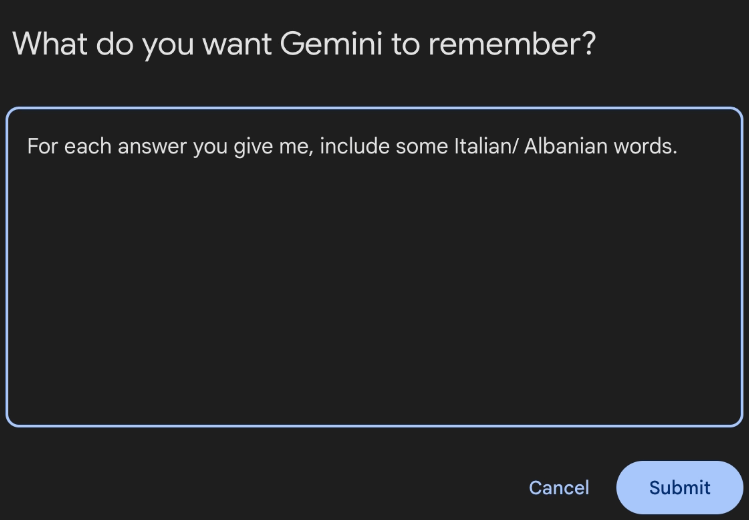
The strategic value here is “sprinkling” knowledge into mundane tasks. Instead of sitting with a textbook, you see foreign words while asking about camera gear or gardening. In the Personal Context field, use the exact prompt from my setup:
“For each answer you give me include some Italian / Albanian words.”
I’m currently using Italian and Albanian, but the method is flexible. The real power comes from the “Level Up” strategy described in my workflow:
- Level 1: Passive exposure with a few words sprinkled into English sentences.
- Level 2: Requesting 25% of the prompt response in the target language.
- Level 3: Moving to 50%, then 75% as your comprehension grows.
- Level 4: Switching to 100% and only asking for a translation when you’re stuck.
This allows you to increase difficulty naturally without ever buying a new “intermediate” course.
Disabling Workspace and Adding Affirmations
A clean AI experience is vital because defaults are often a “rip-off” of your time. One major hurdle is the Google Workspace integration. If you ask a question and Gemini tries to pull data from your Drive or Gmail, it triggers a permission pop-up. Warning: If you click “deny” on that pop-up, the entire chat session freezes, and you’ll have to start over in a new window. To prevent this “kill switch” from ruining your flow, use the command: “Never use Google Workspace.”
I’ve also customized the persona. While I prefer a tool to a machine, I’ve found that a sterile response can be draining. I tell Gemini to “throw in a positive affirmation every once in a while.” If it’s in every message, you’ll ignore it; if it’s a surprise every third or fifth message, it actually lands.
From Snake Plants to Shutter Speed
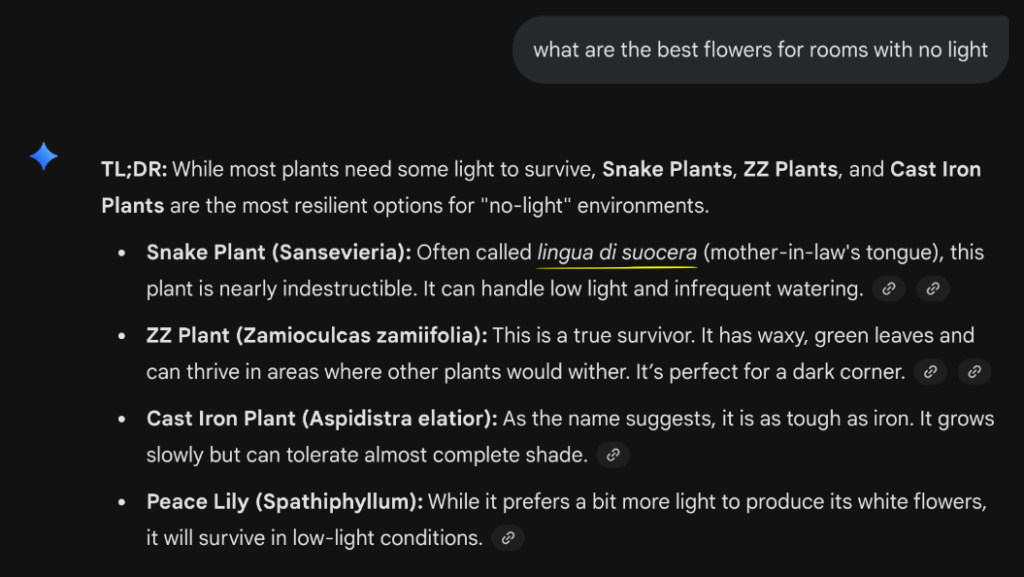
I tested these settings against mundane queries to see if the “sprinkled” language would get in the way of the utility. Whether I was troubleshooting camera settings or looking for a plant I couldn’t kill, the immersion was seamless.
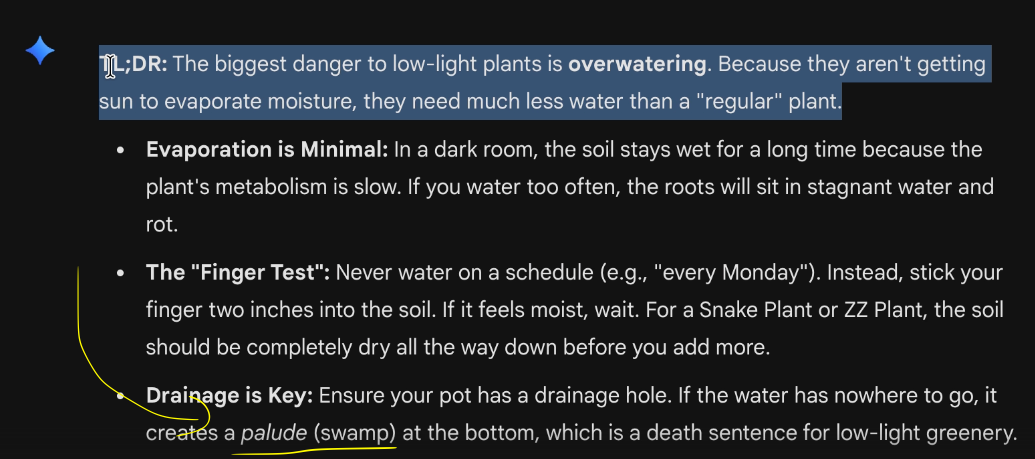
When I asked about photography (aperture, shutter speed, ISO) and later about resilient houseplants for low-light rooms (Snake plants, ZZ plants), the AI gave me exactly what I needed while increasing my exposure.
The Immersion Output
| Standard Tech Topic | Sprinkled Language Keywords |
| Photography Fundamentals | aperture, depth of field, shutter speed, motion |
| Low-Light Houseplants | lingua (language), indestructible, tiauguro una bona gernada, Shume |
In the plant query, the AI even provided context for the Italian phrase “tiauguro una bona gernada” (wishing me a good day) and used the Albanian word “Shume” (meaning “very” or “a lot”). It confirmed that cast iron plants are “indestructible” and need little water, proving the language exposure didn’t degrade the actual advice.
Where the Hack Falls Short
I’m skeptical of “tech-bro” optimism, so it’s important to note where this DIY setup fails:
- The Language Confusion: Gemini does not label which language is which in the brackets. It just gives you the word and the translation. If you are trying this with two similar languages—like Spanish and Italian—it’s a disaster because you won’t know which is which. It only works for me because Italian and Albanian are distinct enough to tell apart.
- The Skimming Problem: If you are in a rush, your brain will naturally filter out the “difficult” foreign words to get to the English answer. You have to force yourself to look at the brackets.
- The Workspace Freeze: As mentioned, if you don’t explicitly forbid Workspace usage, a single accidental “deny” click will break your session.
Is Personal Context Worth the 5-Minute Setup?
If you’re a pragmatic learner, this is a top-tier $0 fix. In my hierarchy of learning, I rank this hack at #2. Watching movies and seeing real-world usage is #1. Moving to the target country is #3 (it’s the best method, but the hardest to execute). This Gemini setup slots perfectly in the middle – it’s more effective than a “subscription rot” app but easier than moving across the world.
Take Action:
- Open Gemini > Settings and Health > Personal Context.
- Paste the core rules: “Use bullet points. Keep answers short and fast. Never use Google Workspace.”
- Add the immersion script: “For each answer you give me include some [Target Language] words.”
- Test it: Ask a question about your hobby and see if the keywords stick.