
← All projects
Python script · 2025
Create all your App Store icons from one image
To publish an app on the App Store you need icons in many sizes. Making them by hand is annoying and takes time. I wrote a Python script that creates all the PNG files and the JSON file for you.
LanguagePython
InputOne 1024×1024 PNG
OutputAll icon PNGs and a JSON file
PriceFree
How to use it
- Download the script below and unzip it.
- Open the script and change the file path to your own 1024×1024 pixel PNG.
- Change the output location to a folder on your disk.
- Run the script with Python. It writes all the icon files and the JSON file into the output folder.
You need Python installed. If the script complains about a missing library, check the imports at the top of the file and install what it lists.
Download
What it looks like
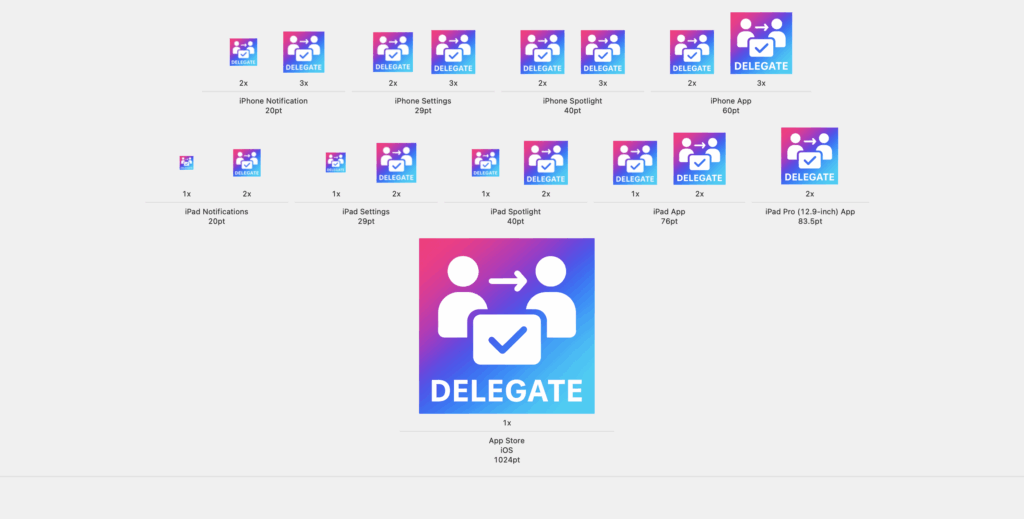
Why I built it
It is the most annoying part of publishing an app. I follow one rule: if a task has to be done more than twice, I automate it. This script is that rule applied to app icons. More of my scripts are on the projects page.
This post may contain affiliate links. These links are marked with an * and I may earn a commission from qualifying purchases.